> ## Documentation Index
> Fetch the complete documentation index at: https://docs.simcel.io/llms.txt
> Use this file to discover all available pages before exploring further.
# New Demand Stream Logic
> Defines how the New Demand Stream (NDS) operates in SIMCEL.
## Purpose
This page explains how the New Demand Stream (NDS) works in SIMCEL and details the logic behind it.
## Prerequisites
Before you create an NDS event, make sure that:
1. The product you want to create a demand stream for is defined in the product master.
2. The proxy product has been chosen and has historical demand in the selected segment. For example, if you create an NDS event for Customer X with Product A and use Product B as the proxy, Product B must have historical demand from Customer X.
## Logic
### Creating an event with a New Product Introduction (NPI) in the overall business
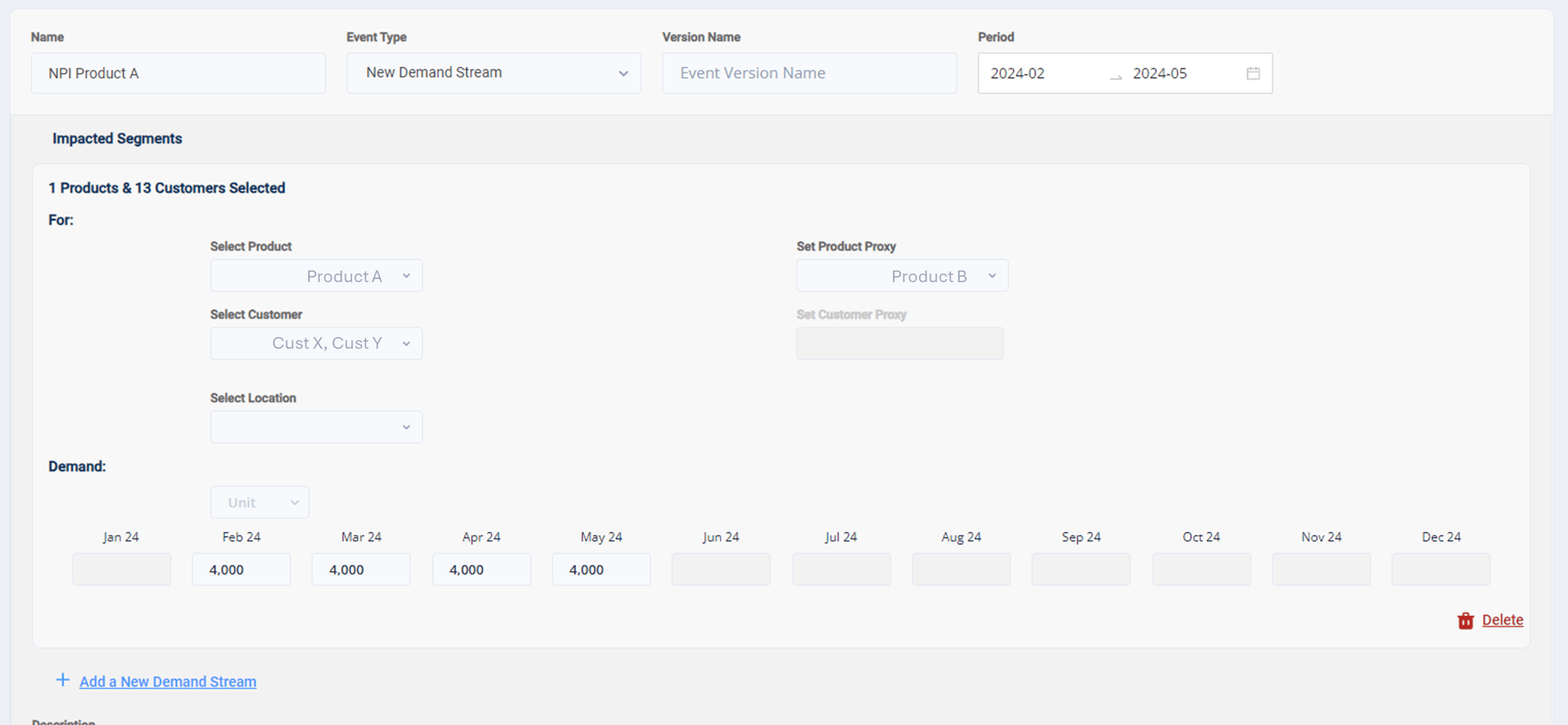
Assume the following scenario:
* **Product A** is a new product, and you want to set a manual demand stream from February to May 2024, with 4,000 units per month.
* **Product A** is planned to be sold to Customers X and Y. The NDS segment is therefore Product A — Customers X and Y.
* In the **Product Proxy** drop-down, you select **Product B** as the proxy product.
 When the event is assigned to a scenario, SIMCEL does the following.
#### 1. Calculate the allocation percentage of the product
SIMCEL first calculates the total sales volume for each month, regardless of the year. For example, for Product B:
* Customer X: 1,000 units sold in February 2022 and 2,000 units in February 2023.
* Customer Y: 2,000 units sold in February 2022 and 5,000 units in February 2023.
* SIMCEL therefore recognizes that Product B sold 3,000 units to Customer X and 7,000 units to Customer Y in February.
SIMCEL then calculates the allocation percentage of the proxy segment for that month:
```text theme={null}
Allocation % (segment, month) = proxy sales for the segment in the month / total proxy sales in the month
Customer X = 3,000 / 10,000 = 30%
Customer Y = 7,000 / 10,000 = 70%
```
#### 2. Assign the demand stream to segments
When you set an NDS event with 4,000 units of Product A in February, SIMCEL allocates the demand using those percentages:
```text theme={null}
Customer X = 30% x 4,000 = 1,200 units
Customer Y = 70% x 4,000 = 3,600 units
```
When the event is assigned to a scenario, SIMCEL does the following.
#### 1. Calculate the allocation percentage of the product
SIMCEL first calculates the total sales volume for each month, regardless of the year. For example, for Product B:
* Customer X: 1,000 units sold in February 2022 and 2,000 units in February 2023.
* Customer Y: 2,000 units sold in February 2022 and 5,000 units in February 2023.
* SIMCEL therefore recognizes that Product B sold 3,000 units to Customer X and 7,000 units to Customer Y in February.
SIMCEL then calculates the allocation percentage of the proxy segment for that month:
```text theme={null}
Allocation % (segment, month) = proxy sales for the segment in the month / total proxy sales in the month
Customer X = 3,000 / 10,000 = 30%
Customer Y = 7,000 / 10,000 = 70%
```
#### 2. Assign the demand stream to segments
When you set an NDS event with 4,000 units of Product A in February, SIMCEL allocates the demand using those percentages:
```text theme={null}
Customer X = 30% x 4,000 = 1,200 units
Customer Y = 70% x 4,000 = 3,600 units
```