
.svg?fit=max&auto=format&n=NwcmN3Uz2rKt7z_Z&q=85&s=5062a9f3b73c4eb9710e4e28d530d3dd)
Definition
The activity log provides a complete timeline of all actions taken on an object such as a Plan, Scenario, or Event. It automatically records changes such as creations and updates, making it easy to see who did what and when. This ensures transparency, accountability, and an auditable record of planning activities.Viewing logged activities
In each object drawer, open the Activity Log tab to see the history of actions related to that object.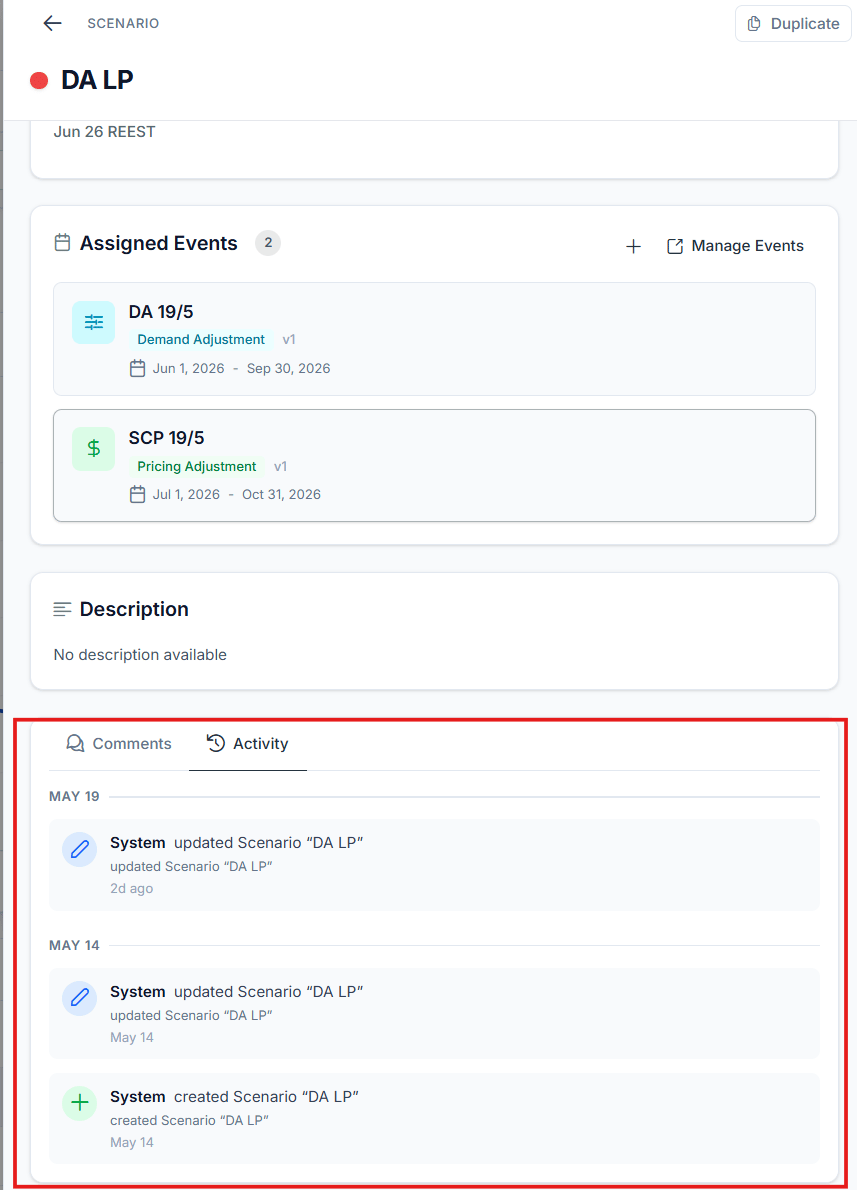
The Activity Log tab in an object drawer
- Object creation, for example “Alice has created Event B”.
- Status changes, for example “John updated Scenario A”.
- Other edits and modifications to the object.
Grouping and ordering
The log organizes entries by day, with the most recent actions displayed at the top. Within a day, actions appear in the order they occurred, making it easy to follow the sequence of updates.Example user journey
1
Create a scenario
You create a new scenario.
2
A teammate edits it
A teammate makes an edit to the same scenario.
3
Update an event
You update one of the scenario’s events.
4
Open the Activity Log
Open the Activity Log tab. All three actions are listed, each with the user’s name, a timestamp, and a short description.