
.svg?fit=max&auto=format&n=NwcmN3Uz2rKt7z_Z&q=85&s=5062a9f3b73c4eb9710e4e28d530d3dd)
Formula - actual
Actual figures come from uploaded data and are never editable.Actual SIT month n (Ac.SIT n)
Displayed in days. Not editable.- This calculation can be applied at any level.
- n→x is the number of months to consider and is specific to each workspace.
- Ac.Cl.S.Value.n is the closing stock value and can be expressed considering either listed price or Distributor GSV.
- Product.Value can be listed price or Distributor GSV depending on each workspace.
Formula - unconstrained
Future Sales Out month n (Fu.S.Out n)
Displayed in boxes: from the scenario Sales Out forecast. Not editable. Displayed in value (not editable):- This calculation can only be applied at terminal level (distributor-product).
Future Sales In month n (Fu.S.In n)
Displayed in boxes. Editable.- This calculation can be applied at any level.
- n→x is the number of months to consider and is specific to each workspace.
- This calculation can only be applied at terminal level (distributor-product).
- Product.Value can be listed price or Distributor GSV depending on each workspace.
Future Closing Stock month n (Fu.CLS n)
In boxes. Editable.- This calculation can be applied at any level.
- n→x is the number of months to consider and is specific to each workspace.
- This calculation can be applied at any level.
- Product.Value can be listed price or Distributor GSV depending on each workspace.
Future SIT month n (Fu.SIT n)
Displayed in days. Editable. Sourced from the Distributor SIT target file (this can only be applied at terminal level, distributor-product), or calculated as:- This calculation can be applied at any level.
- n→x is the number of months to consider and is specific to each workspace.
- Fu.Cl.S.Value.n is the closing stock value and can be expressed considering either listed price or Distributor GSV.
- Product.Value can be listed price or Distributor GSV depending on each workspace.
Formula - constrained
Constrained Future Sales In month n (Con.Fu.S.In n)
Displayed in boxes: from the scenario DemandFullfilmentMetrics. Not editable. Displayed in Gross Sales Value (not editable):- This calculation can only be applied at terminal level (distributor-product).
Constrained Future Sales Out month n (Con.Fu.S.Out n)
Displayed in Gross Sales Value. Not editable.- This calculation can only be applied at terminal level (distributor-product).
- These calculations can only be applied at terminal level (distributor-product).
Constrained Future Closing Stock month n (Con.Fu.CLS n)
Displayed in Gross Sales Value. Not editable.- This calculation can only be applied at terminal level (distributor-product).
- These calculations can only be applied at terminal level (distributor-product).
Constrained Future SIT month n (Con.Fu.SIT n)
Displayed in days. Not editable.- This calculation can be applied at any level.
Notes
- If you make an adjustment in value (Sales In or Closing Stock), the tool first converts it into an adjustment in volume, performs the recalculation, and then translates it back to value.
- The table displays a warning icon if your adjustments result in negative numbers. You need to address these discrepancies by expanding the table and identifying the source. If you decide to simulate anyway, any negative Sales In is treated as 0.
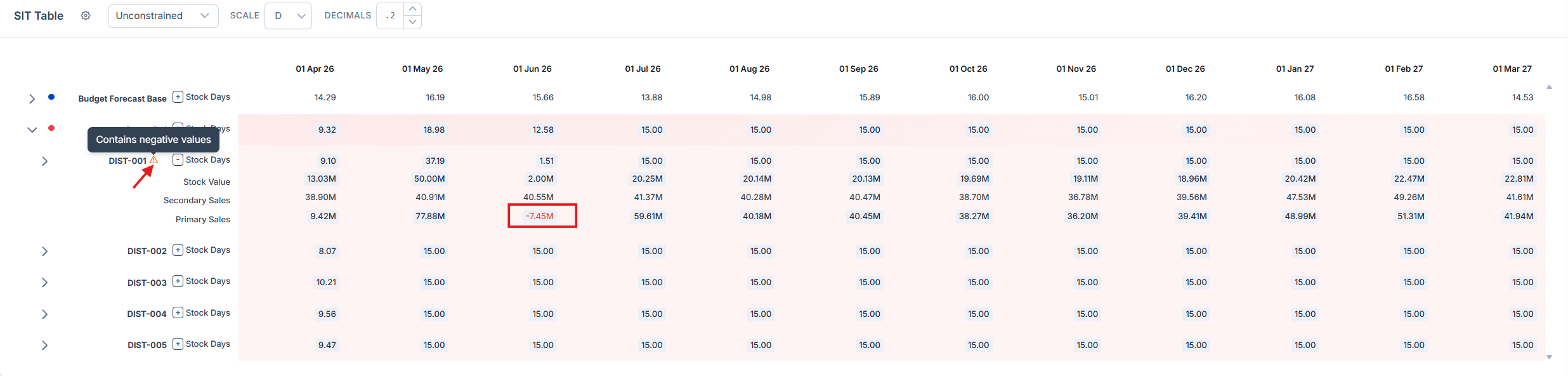
The warning icon shown when adjustments produce negative numbers
- If the Sales Out of 3 consecutive periods is null, the SIT is not calculated and NAN is displayed instead.
- If any editable value is 0, the aggregated level cannot redistribute the lower levels because redistribution is based on the child ratio (which is 0 in this case). You need to edit the atomic level (distributor-product).