
.svg?fit=max&auto=format&n=NwcmN3Uz2rKt7z_Z&q=85&s=5062a9f3b73c4eb9710e4e28d530d3dd)
Purpose
This page explains how the New Demand Stream (NDS) works in SIMCEL and details the logic behind it.Prerequisites
Before you create an NDS event, make sure that:- The product you want to create a demand stream for is defined in the product master.
- The proxy product has been chosen and has historical demand in the selected segment. For example, if you create an NDS event for Customer X with Product A and use Product B as the proxy, Product B must have historical demand from Customer X.
Logic
Creating an event with a New Product Introduction (NPI) in the overall business
Assume the following scenario:- Product A is a new product, and you want to set a manual demand stream from February to May 2024, with 4,000 units per month.
- Product A is planned to be sold to Customers X and Y. The NDS segment is therefore Product A — Customers X and Y.
- In the Product Proxy drop-down, you select Product B as the proxy product.
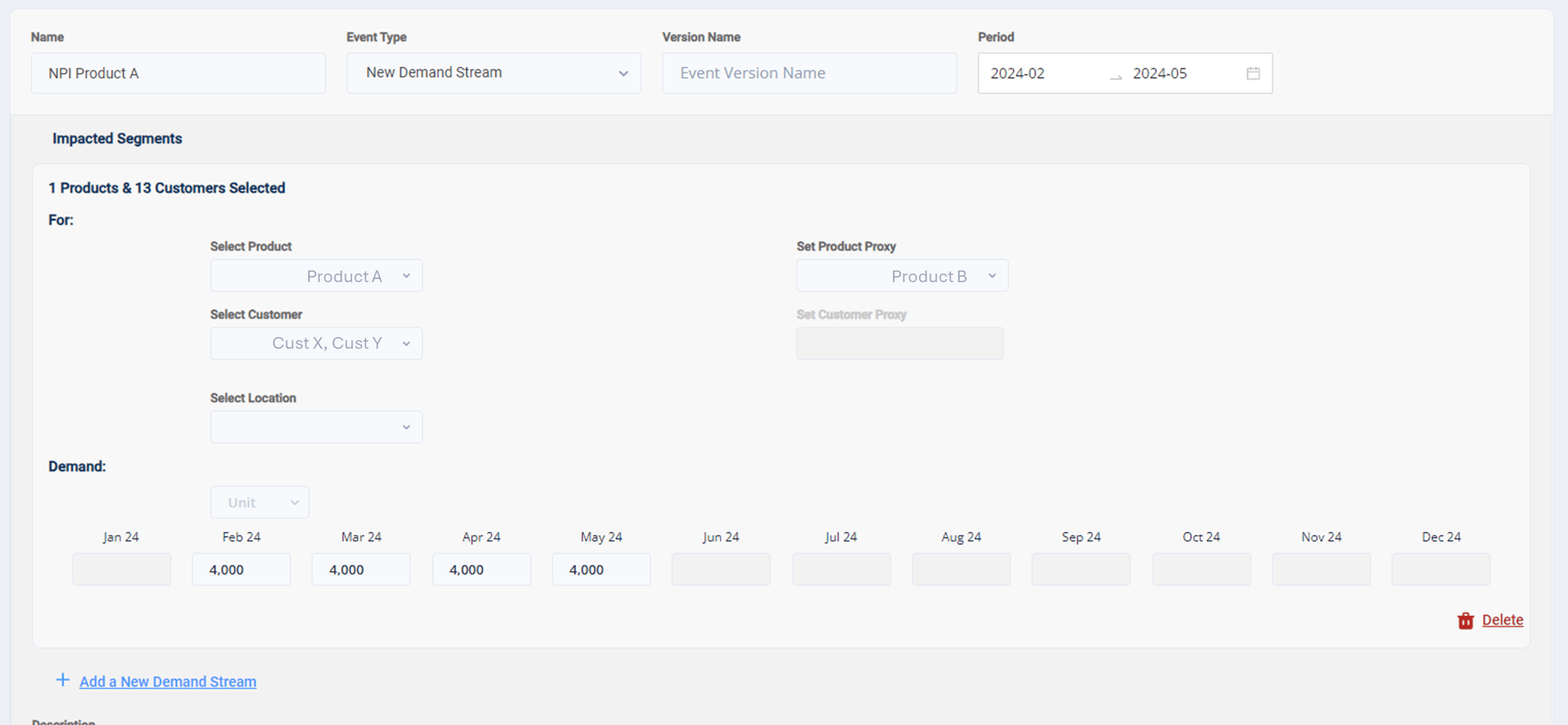
An NDS event for Product A using Product B as the proxy
1. Calculate the allocation percentage of the product
SIMCEL first calculates the total sales volume for each month, regardless of the year. For example, for Product B:- Customer X: 1,000 units sold in February 2022 and 2,000 units in February 2023.
- Customer Y: 2,000 units sold in February 2022 and 5,000 units in February 2023.
- SIMCEL therefore recognizes that Product B sold 3,000 units to Customer X and 7,000 units to Customer Y in February.